
Accidents happen, and when they do, having the protection of an EWPS (Extended Warranty Protection Service) plan can make all the difference. But what exactly happens when you submit a claim with EWPS? In this article, we’ll walk you through the claims process step-by-step so you know what to expect and how to navigate the experience with ease.
Why Submitting a Repair request with EWPS is Easy and Stress-Free
EWPS has designed its repair process to be as straightforward as possible, allowing you to get back to using your device with minimal disruption. Here’s what you need to know about the process.
Step 1: Log in to Your EWPS Account
To begin a repair proces, start by logging into your EWPS account on the website or mobile app. Once you’re in, head over to the ‘device’ section.
Tip: Make sure you have your account credentials handy and that your device’s information is up-to-date in your account.
Step 2: Click the Device you want to make request for
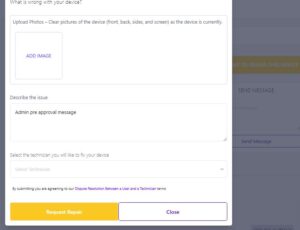
In the repair section, make sure the device to be repaired has the updated information in the system. send a message to the Common details required include:
- Device type and model
- Description of the problem
- When the damage occurred
- Any relevant documentation, like a repair estimate or photos of the damage
Note: Be as detailed as possible in your description to help speed up the review process.
Step 3: Submit Proof of Purchase
If you haven’t already uploaded proof of purchase during registration, you may be required to submit it now. This helps EWPS verify ownership and validate your protection plan.
Step 4: Review and Submit the Request
Once you’ve filled out the form and attached all necessary documents, review everything to make sure it’s accurate. After you’re satisfied, submit the requestfor processing.
Step 5: Request Review by EWPS
After you submit the request, EWPS will review your request to determine eligibility based on your protection plan. This review process typically includes:
- Verifying plan coverage under your current plan
- Evaluating the damage or issue described
- Confirming that all necessary documentation has been provided
The review may take less than 24hrs, depending on the complexity of the request and the information provided.
Step 6: Approval and Next Steps
Once approved, EWPS will provide you with instructions for the next steps. Depending on the nature of the damage and your plan’s coverage, EWPS may:
- Arrange for a repair at a designated repair center
- Offer a replacement device
- Approve a reimbursement if you’ve already covered repair costs. Also its adviseable not to make any repair when you have a subscription to avoid void warranty.
Tip: Check your protection plan to see what options are available under your coverage.
Step 7: Completion and Follow-Up
After your request is processed and resolved, EWPS will follow up to ensure your satisfaction and verify that the issue has been fully addressed. Keep a copy of any documentation or emails related to the request for your records.
Common Questions About the EWPS Repair Request Process
1. How long does it take to process a request? Repair request processing times vary depending on the type of damage and your coverage plan. EWPS aims to resolve most request between a few days.
2. Do I have to pay anything when filing a request? Some plans may have a deductible or fee associated with specific types of request. Check your EWPS plan details for more information.
3. What happens if my request is denied? If a request is denied, EWPS will provide an explanation. In some cases, additional documentation can be submitted for reconsideration.
Why Choose EWPS for Device Protection?
With EWPS, you’re backed by a comprehensive repair request process that’s simple and supportive. From the moment you submit a request to the final resolution, EWPS is committed to making your experience hassle-free.
Submitting a claim with EWPS is a straightforward process designed to get you back to using your device as quickly as possible. With clear steps and helpful support along the way, you can feel confident that EWPS has your back in times of need. Protect your devices with EWPS and experience true peace of mind.